
Malware never sleeps

Malware and Trojans and Viruses, oh my!

Oh geez, again? This crap is really annoying.

So I just launched a new web presence for Engineer LLC (my new encompassing venture for business). I set up a WordPress blog on the site. So I was checking out the “official” themes on the “official” WordPress website a bit later and I saw one that looked interesting. Curious to see more I selected the hyperlink for the theme Author…

!!! AHHHRGH !!! Malware Attack !!! AHHHRG !!!

Malware

Luckily, Microsoft Security Essentials trapped it right away. However, it had apparently left the tentacles. Next day… OK the computer starts fine, but wait there’s more! Now my browsers (all of them) keep getting the home page hijacked to some Spanish language Movie website? Gimme a break!

(Update 01/07/2012) The annoyance took a bit of work to get rid of, but now it’s gone. While the anti malware stuff caught and killed the threats immediately, it left behind 2 executables in the temporary and program data folders, set to run on startup and lurk until a browser was run. Then the registry was overwritten with the offending url over and over again. Narrowing it down was a hassle. Shut down all the browser add-ons, nope. Run msconfig and deselect all suspected interlopers and possibly compromised legit apps. OK that stopped it. reactivate the browser add-ons one by one, nothing there. Delete the startup items that are not recognizable and enable the suspected legit apps. Restart again and it’s still OK. OK then it was one or more of those unrecognizable .exe files. Stinky malware…

Legacy Applications getting harder to support

Is it just me or is there a disconnect between what OS and Software vendors sometimes do to alienate their customers.

Example: I have a client who uses a certain major vendor’s application in his business that only runs on Windows XP. Hey this is 2011! They have been promising to have a pending update to Vista then 7 compatibility for nearly 4 years now, but still nothing. The laptop in use to run this app is getting old. You can’t get a new one with XP of course, and the choices for hardware that will even run it are rapidly drying up. After a bunch of research I recommended an XPS L702x from Dell, since by all indications a full compliment of drivers for XP were available for this hardware. OOPS! Well for everything but the NVidia Display adapter, but even with all of the right drivers XP runs like a DOG! ARGGH.

From the Microsoft Windows 7 “Loadfest”…

Today I am writing from Microsoft’s Irvine office.  It’s the windows 7 “Loadfest”, a Partner presentation on installing, selling and some of the cool new features in Windows 7.   The presentation is hosted by Woody Walton.  I have been using W7 for a while now, and just installed Windows 7 Ultimate x64 on my Toshiba Notebook (from which I am authoring this post).  I am pleased with the product so far.  I first loaded it onto one of my development systems in February 2009 when it was in beta test. I really didn’t use the beta a lot, but began using it a bit more after updating to the RC a couple months later. As soon as the MSDN RTM came out, I began using the x64 Ultimate version on a regular basis, and have now abandoned (for the most part) the Vista32 Ultimate installation on the same development box. Being a Software/Firmware Developer, my experience includes installing an alternative driver for Microchip’s MPLAB ICD2 Programmer/Debugger device not written for Windows 7 (with favorable results)!   There are some cool new features we are learning of.  Something particularly interesting is the attention they have given to making attached devices like cameras and media players show up with a more intuitive Icon.  For example: your camera is more likely to show up as a camera instead of just another drive.  Right now we are learning about the enhanced security for “Homegroup” environments (an updated version of Workgroup level networks).  Vista computers can join a Homegroup while XP or downlevel OS versions can not.

The infamous UAC (universally hated in Vista) has been changed to allow users to choose from 4 different levels, and a new feature called AppLocker can allow more selective Execution prevention measures.

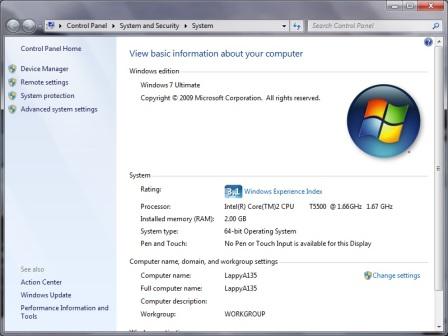
Here’s a screen capture of my Notebook’s Properties page…

Windows 7 Ultimate x64

Now before you go calling me a M$ $ellout, be advised that the Notebook also dual boots into Ubuntu 9.04 for the gratification of all the Open Source fans out there too!

Tux!